[DRAFT] Implementing a diagram rendering tool
For diagrams in this blog, I use diagrams.net (previously known as draw.io/drawio.com). Some time ago,
I got frustrated with manually exporting svg files for every page, and made a little script
which exports every page in light and dark themes.
This was OK, for a while, but it was slow (~3 seconds per diagram) and it started getting on my nerves.
The diagrams that I make are quite simple, they all look something like this:

Nothing fuels me more than a computer not doing its job properly. Why do I need to spin up a whole Chromium instance to generate 2KiB worth of SVG tags?
It can't be that hard.
Looking at the drawio file format
The file format used by drawio is just XML, here's the previous diagram in all its glory:
<mxfile host="Electron" agent="Mozilla/5.0 (X11; Linux x86_64) AppleWebKit/537.36 (KHTML, like Gecko) draw.io/24.7.5 Chrome/126.0.6478.183 Electron/31.3.0 Safari/537.36" version="24.7.5" pages="2">
  <diagram id="CaypJM6uljNCg2ii8YJU" name="simple">
    <mxGraphModel dx="1100" dy="999" grid="1" gridSize="10" guides="1" tooltips="1" connect="1" arrows="1" fold="1" page="1" pageScale="1" pageWidth="850" pageHeight="1100" math="0" shadow="0">
      <root>
        <mxCell id="0" />
        <mxCell id="1" parent="0" />
        <mxCell id="BKDJbydcZCFkUFjeQ1YP-3" style="edgeStyle=orthogonalEdgeStyle;rounded=0;orthogonalLoop=1;jettySize=auto;html=1;entryX=0;entryY=0.5;entryDx=0;entryDy=0;" edge="1" parent="1" source="BKDJbydcZCFkUFjeQ1YP-1" target="BKDJbydcZCFkUFjeQ1YP-2">
          <mxGeometry relative="1" as="geometry" />
        </mxCell>
        <mxCell id="BKDJbydcZCFkUFjeQ1YP-1" value="Some text" style="rounded=0;whiteSpace=wrap;html=1;" vertex="1" parent="1">
          <mxGeometry x="240" y="380" width="120" height="60" as="geometry" />
        </mxCell>
        <mxCell id="BKDJbydcZCFkUFjeQ1YP-2" value="Some other text" style="rounded=0;whiteSpace=wrap;html=1;fillColor=#ffe6cc;strokeColor=#f08c00;" vertex="1" parent="1">
          <mxGeometry x="440" y="320" width="120" height="60" as="geometry" />
        </mxCell>
      </root>
    </mxGraphModel>
  </diagram>
</mxfile>
A few things jump out by just looking at this quickly:
- There is some kind of directed relationship:
idis used forsourceandtarget - Properties can be expressed through rich objects: the box geometries are represented as
mxGeometry - Styles are represented as strings, completely disregarding the previous point
Parsing the drawio XML
Basic blocks:
- Text
- Shape
- Arrow
- EdgeLabel (Text on arrows)
All basic blocks are represented as mxCell, and distinguishing between the variants is easy but unnecessarily complex:
- If the cell has an
edgeproperty, then it's anArrow - If the cell style has a
textproperty, then it's aText - If the cell style has an
edgeLabelproperty, then it's anEdgeLabel - Otherwise, it's a shape
If your representation allows for rich objects, why use mxCell for everything?
Some things of note:
Some properties have default values, in which case the keys will not be present on the XML, unless you change the value on the editor, then change it back to default. I did this on every property to get the default values.
The order of items in the XML is the rendering order; if two elements overlap, then the last one on the XML should be rendered on top.
Nesting is possible, via the parent property, in which case some attributes will be relative to the parent (mostly positioning).
Arrows reference a source and a target, but the arrow itself can be in the XML before either referenced element, requiring a two-pass parser.
Rendering
Let's start with a simple element, a box with text inside. The first thing to note is that text can be aligned within its bounding box via the align (left, center, right) and verticalAlign (start, center, end) properties, which can generate all these options:

The text's bounding box can also be positioned adjacent to the original box with the labelPosition (left, center, right) and verticalLabelPosition (top, middle, bottom) properties.

this text element still is a property of the box, but it is positioned:
- labelPosition: left (outside of the box, to the left)
- verticalLabelPosition: middle (outside of the box, same Y value)
- align: center (within its bounding box)
If we look at all the options for the bounding box, it looks like this:

So far, implementing this is quite straight forward: based on the bounding box positioning properties, adjust the X and Y coordinates of the SVG text element by {+width, -width} and {+height, -height}
The first real problem I faced was when trying to render a "large" box, where its bounding box was adjacent to itself
 The bounding box is colored to make the point obvious, they are not usually visible.
When rendering this kind of diagram, the viewport for the resulting svg is far too wide; clearly the entire bounding box is not necessary in the viewport.. but how much of it is necessary? The text could be centered, or long, or both!

How does the drawio exporter solve this? If we peek at the generated svg we can see
<div style="display: ...; width: 292px; height: 1px; ...;">
    <!-- 8< 8< -->
    some longer text, centered
It measured the text size!
Rendering text
Text rendering, as we all know, is very simple. It is composed of letters that only go from left to right, and where a pair of letters is always represented as the concatenation of both letters individually. RTL? No. Ligatures? Absolutely not.
Reading Imagemagic's determining font metrics, I could make some sense of fonttools internals and render some text.
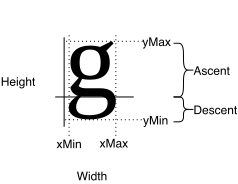
I ended up with 3 text implementations:
Using HTML text is the easiest — the browser rendering engine takes care of everything, I just need to carefully use flex and transform:translate().
The only problem, is that opening the SVG with non-CSS capable viewers will just not show anything.
Next, I implemented text using SVG's Text element, which does no wrapping on its own; so I manually calculate the size of the bounding box & the wrapping, by analyzing the properties of each glyph (~letter) of the selected font.
The only problem is that maybe you don't have the selected font, and now I'll need to link it to the SVG file, if text precision is important.
Last, I implemented "expanding" of text, that is, converting each letter to a set of SVG Paths, by parsing the points that are present on the TTF font.
The only problem is that now the SVGs carry a lot of redundant information, and end up pretty large. Maybe gzipping takes care of it, maybe not. -
Automatically routing arrows
Draw.io implements a routing algorithm that, while it usually works well, can only be considered degenerate.
For example:

Note that in this case, only the destination point (with the arrow) is pinned; the source is free to rearrange itself for shortest path / least collision.
Now, if you have this arrangement

And move B to the left

You suddenly get a loop? Why?
I want to mirror the algorithm used here, but I have no interest in mirroring the degenerate cases -- I never depend on them.
I couldn't figure out a generic solution for this, though there are some patterns:
- The point of entry/exit onto the block follows a perpendicular to keep a "margin" from the shape
- There is some kind of "midpoint" that generates a "turn"
With this, I made 'special cases' for certain combinations:
- A top ⇄ bottom connection always has a margin + a midpoint; with those 5 points (origin, margin, midpoint, margin, destination), it properly renders.
- A left ⇄ right connection doesn't follow the midpoint
- "L" shapes (bottom/top ⇄ left/right)
To prevent these aberrations from happening, you can introduce a set of 'fixed' points manually; but the algorithm doesn't really change -- the source or destination points get a bit closer, that's it.
References
- https://learn.microsoft.com/en-us/typography/opentype/spec/
- https://fonttools.readthedocs.io/en/latest/
 RSS feed