[DRAFT] Reverse engineering a smart watch
I bought a Withings ScanWatch 2, but I don't really like downloading apps on my phone -- they are usually shitty and a privacy nightmare, so I set out to reverse the protocol and see if I can pull the data that I want in a nice way.
To get started, install the app and pull the APK for analysis:
adb shell pm list packages | grep -i withings
package:com.withings.wiscale2

adb shell pm path com.withings.wiscale2 | cut -d: -f2 | while read -r line; do adb pull $line; done
/data/app/.../base.apk: 1 file pulled, 0 skipped. 36.6 MB/s (90246106 bytes in 2.350s)
/data/app/.../split_config.arm64_v8a.apk: 1 file pulled, 0 skipped. 36.7 MB/s (5875537 bytes in 0.153s)
/data/app/.../split_config.en.apk: 1 file pulled, 0 skipped. 34.6 MB/s (1417754 bytes in 0.039s)
/data/app/.../split_config.xxhdpi.apk: 1 file pulled, 0 skipped. 36.6 MB/s (61316747 bytes in 1.598s)

$ ls -lhSr
total 152M
-rw-r--r-- 1 david david 1.4M Jul 29 10:38 split_config.en.apk
-rw-r--r-- 1 david david 5.7M Jul 29 10:38 split_config.arm64_v8a.apk
-rw-r--r-- 1 david david  59M Jul 29 10:38 split_config.xxhdpi.apk
-rw-r--r-- 1 david david  87M Jul 29 10:38 base.apk
Then run both base.apk and split_config.arm64_v8a.apk through jadx (we ignore .en.apk and xxhdpi.apk because they only contain language data and images/videos respectively).
In the arm64_v8a.apk, we can find the native libraries
arm64-v8a$ ls -lhSr
total 12M
4.7K libcrashlytics-trampoline.so
4.8K libsurface_util_jni.so
7.0K libdatastore_shared_counter.so
9.9K libandroidx.graphics.path.so
 11K libnerveHealthScore.so
 14K libvo2-lib.so
 22K libsleep-lib.so
 29K libimage_processing_util_jni.so
 70K libete.so
 88K libecgw2-lib.so
142K libecg-lib.so
218K libcrashlytics-handler.so
227K libcrashlytics.so
402K libfilament-utils-jni.so
413K libhealthmate.so
846K libcrashlytics-common.so
1.7M libfilament-jni.so
3.2M libgltfio-jni.so
4.8M libbarhopper_v3.so
Poking through the protocol declaration
and when decompiling base we can get a large part of the protocol (wpp) implementation at com/withings/comm/wpp/i.java
public byte readByte(ByteBuffer byteBuffer)
public byte[] readByteArray(ByteBuffer byteBuffer)
public int readInt(ByteBuffer byteBuffer)
public int[] readIntArray(ByteBuffer byteBuffer)
// ...
public void writeByte(ByteBuffer byteBuffer, byte b12)
public void writeByteArray(ByteBuffer byteBuffer, byte[] bArr)
public void writeInt(ByteBuffer byteBuffer, int i12)
public void writeIntArray(ByteBuffer byteBuffer, int[] iArr)
// ...
and a treasure trove of constants at com/withings/comm/wpp/generated/Wpp.java
short CMD_ADC = 523;
short CMD_ALARM_GET = 290;
short CMD_ALARM_SET = 283;
short CMD_ALGO_PARAM_SET = 2474;
short CMD_ANS_GET = 2372;
short CMD_ANS_SET = 2373;
short CMD_APP_CAPABILITIES = 2445;
short CMD_APP_IS_ALIVE = 2412;
// ...
if we look at two pairs:
short CMD_SET_ALARM = 292;
short CMD_GET_ALARM = 293;

short CMD_GET_ALARM_ENABLED = 2330;
short CMD_SET_ALARM_ENABLED = 2331;
they don't seem to be consistent (SET is not GET+1)
there's also types:
short TYPE_ALARM = 1298;
short TYPE_ALARM_ENABLED = 2329;
short TYPE_BATTERY_PERCENT = 263;
short TYPE_BATTERY_STATUS = 1284;
and what I assume are enums
short BATTERY_STATUS_CHARGING = 0;
short BATTERY_STATUS_CRITICAL = 3;
short BATTERY_STATUS_LOW = 1;
short BATTERY_STATUS_OK = 2;
short BATTERY_STATUS_SAMPLES_NB_MAX_VAL = 32;
Let's look at the WppMessage definition
/* compiled from: WppMessage */
public final class f {

    /* renamed from: a  reason: collision with root package name */
    private final byte f44780a;

    /* renamed from: b  reason: collision with root package name */
    private short f44781b;

    /* renamed from: c  reason: collision with root package name */
    private List<i> f44782c;
Didn't find much on the first argument, assume it is probably some kind of protocol/version flag (single byte)
second argument is used in com/withings/comm/wpp/f.java
public final int a() {
  return (short) (this.f44781b & Wpp.CMD_CHANNEL_MASK);
}
public final short b() {
  return (short) (this.f44781b & 16383);
}
public final void g() {
    this.f44781b = (short) (b() | Wpp.CMD_CHANNEL_SLAVE_REQUEST);
}
where
short CMD_CHANNEL_MASK = -16384;
short CMD_CHANNEL_SLAVE_REQUEST = 16384;
this implies that the upper two bits are for channel (-16384 == 0xC000), and the lower 14 bits are probably for 'command'. why command? a lovely toString:
public final String toString() {
    StringBuilder sb2 = new StringBuilder();
    sb2.append(Wpp.prettyByte(this.f44780a));
    sb2.append(" ");
    sb2.append(Wpp.prettyCommand(this.f44781b));
    sb2.append(" ");
    sb2.append(Wpp.prettyCommand((short) c()));
    for (i iVar : this.f44782c) {
        sb2.append("  ");
        sb2.append(iVar.toString());
    }
    return sb2.toString();
}
(but prettyCommand is used for c() also, so it's just a guess)
then, the third argument is List<i> f44782c
from usage, we can see that i has getSize and toString
public final int c() {
    int i12 = 0;
    for (i size : this.f44782c) {
        i12 += size.getSize();
    }
    return i12;
}
and running grep -R getSize sources/com/withings/comm/wpp only returns the WppObject class in i.java
so, we have
WppMessage = {
    byte version;  // or protocol
    short command; // channel info (2 bits) | Command ID (14 bits)
    List<WppObject> objects;
}
moving to WppObject we know there are 4 bytes of metadata:
short getSize() {
    return (short) (getDataSize() + 4);
}
and some hints to imply it's TLV (type-length-value):
int SIZE_SIZE = 2;
int TYPE_SIZE = 2;
implying that the cleaned up wire types are
WppMessage = {
    byte version;  // or protocol
    short command; // channel info (2 bits) | Command ID (14 bits)
    List<WppObject> objects;
}
WppObject = {
    short type;
    short length;
    byte[] value;
}
Traffic analysis
Around this point, I received my watch, and started looking at the live traffic with the amazing btsnoop-extcap, which lets Wireshark access your phone's live capture through ADB.
The first step to analyze a protocol is to capture some data and get a feel for the format, so here are some packets:
Enabling the 'long press' feature:
01 09 89 00 09 09 a1 00 01 06 01 00 00 00
Disabling the 'long press' feature:
01 09 89 00 09 09 a1 00 01 00 01 00 00 00
                           ^^ only this byte changed
this is fantastic: no encryption, no nonces, just a nice protocol.
Now, with the 'long press' feature enabled, enabled this is setting it to 'Start a breathe session'
01 09 89 00 09 09 a1 00 01 05 01 00 00 00
and this is setting it to 'Start the stopwatch'
01 09 89 00 09 09 a1 00 01 06 01 00 00 00
                           ^^ changed
these values (05, 06) match com/withings/comm/wpp/generated/object/ShortcutAction.java
short BREATH = 5;
short STOPWATCH = 6;
// ...
in that file, we can also find the function getType() which just returns 2465 (== 0x9a1) and getDataSize() which just returns 1.
which means we know
0000   01 09 89 00 09 09 a1 00 01 06 01 00 00 00
                                  ^^ payload
                            ^^^^^ data size (big endian)
                      ^^^^^ type (big endian)
                ^^^^^ payload len (big endian)
          ^^^^^ CMD_SHORTCUT_SET (2441 == 0x0989)
        ^^ PROTOCOL (guess)
and we have 4 bytes at the end (`0x1000000), and no idea what those are.. for now they are static.
Let's do this again to see if the pattern holds up, by turning auto-brightness off
01 09 41 00 06 09 37 00 02 01 64
and on
01 09 41 00 06 09 37 00 02 00 64
                           ^^
let's try to decode again
01 09 41 00 06 09 37 00 02 00 64
                           ^^^^^ payload
                     ^^^^^ data size
               ^^^^^ type
         ^^^^^ payload len
   ^^^^^ CMD_SET_LUMINOSITY_LEVEL (2369 == 0x941)
^^ protocol (guess)
so.. this matches the same as before, and no extra 0x1000000 padding
and setting the brightness to 100%
0000 01 09 41 00 06 09 37 00 02 01 64
to 0%
0000 01 09 41 00 06 09 37 00 02 01 00
and to ~50%
0000 01 09 41 00 06 09 37 00 02 01 2e
so this shows that the last byte ranges from 0 to 100 (0x64), regardless of whether auto-brightness is enabled or not
Automated packet dissecting
Manually decoding each packet is a pain, we can make a dissector to follow the patterns that we guessed and see if they hold up.
There's not a lot of magic in a dissector, it's a Lua program that takes a packet in, decides whether to handle it or not, and decodes the bytes.
Here's a little part of the dissector
protocol = buffer(0,1):uint()
command_raw = buffer(1,2):uint()
payload_len = buffer(3,2):uint()

command = bit.band(command_raw, COMMAND_MASK)
channel = bit.rshift(bit.band(command_raw, CHANNEL_MASK), 14)

command_name = commands_by_id[command]
offset = 5

while offset < payload_len do
    obj_type = buffer(offset,2):uint()
    obj_size = buffer(offset+2,2):uint()

    type_name = type_names[obj_type]
    if obj_type == types_by_name.TYPE_SHORTCUT_ACTION then
        action_val = data_buffer(0,1):uint()
        action_name = shortcut_actions[action_val]
        action_label = "Action: " .. action_name .. " (" .. action_val .. ")"
        obj_subtree:add(buffer(offset+4, 1), action_label)
    end
end
if you place your dissector in ~/.local/lib/wireshark/plugins/ and hit CTRL-SHIFT-L in WireShark, then the packets will be decoded, and the payload
01 09 92 00 09 09 a1 00 01 06 01 00 00 00
will now show as
Withings Proprietary Protocol
    Protocol Version: 0x01 (0x01)
    Command: 0x0992 (CMD_SHORTCUT_GET)
    Payload Length: 9
    TYPE_SHORTCUT_ACTION
        Object Size: 1
        Object Data: 06
        Action: STOPWATCH (6)
    TYPE_NO_DATA
        Object Size: 0
Now it's just a matter of spending a few hours adding a ridiculous amount of constants and trivial destructuring.
During those hours, I found some weird stuff, first I thought it was some conversion factor that I don't understand, but.. even the app and watch disagree?
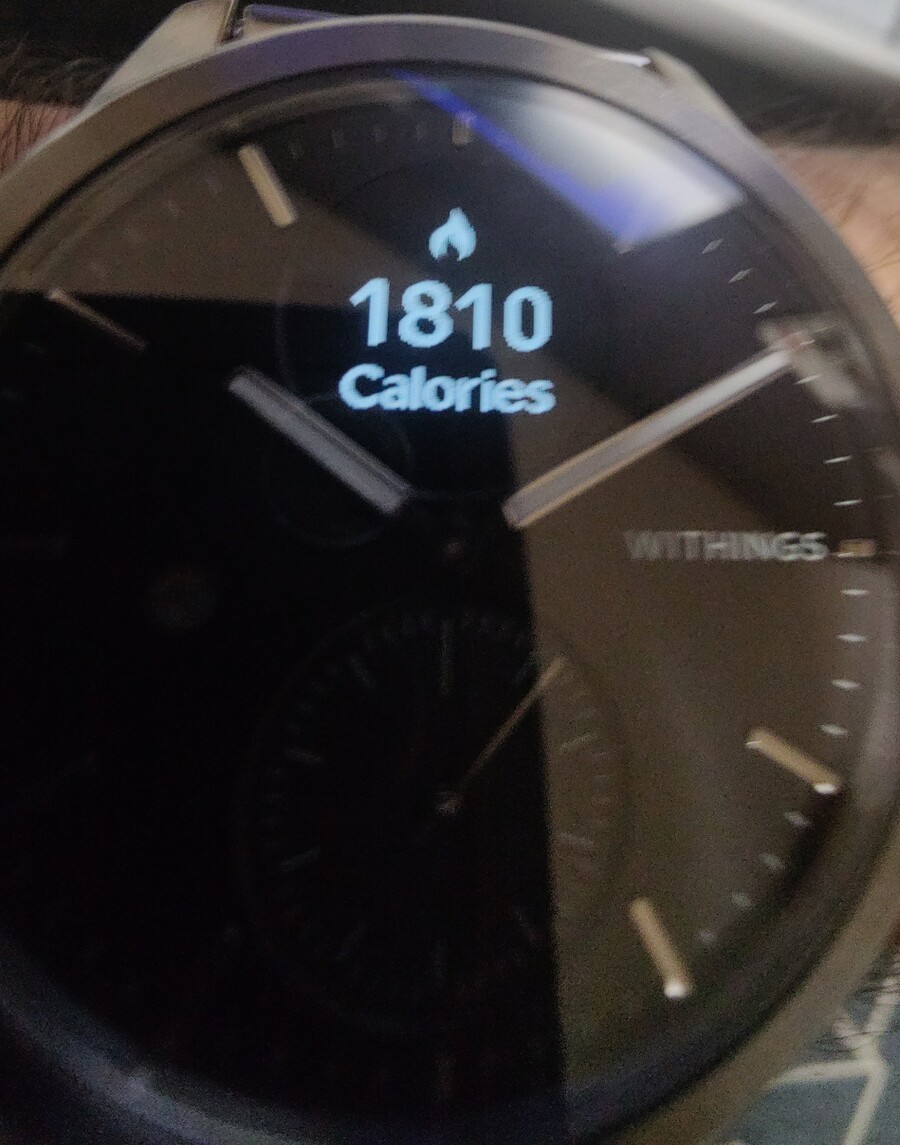
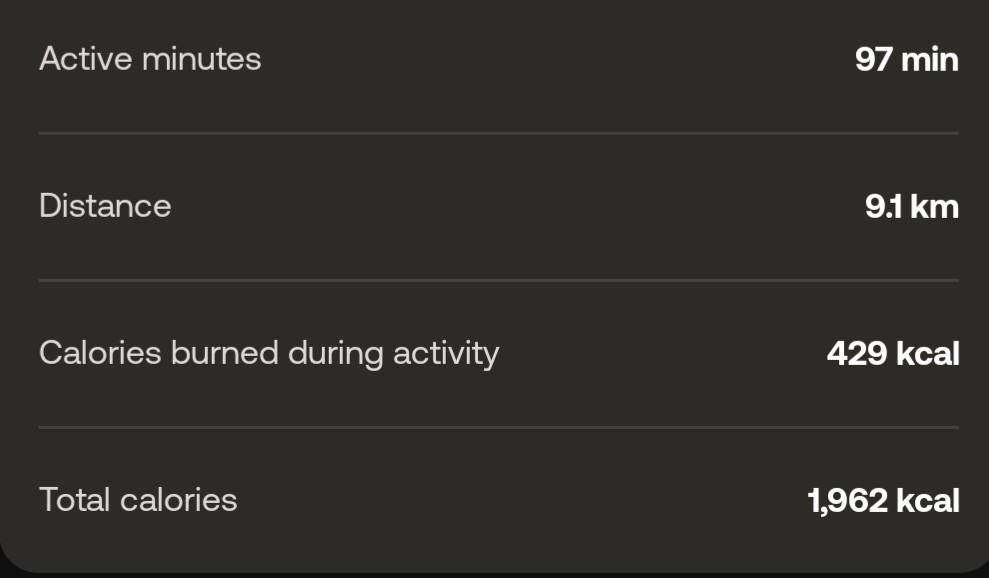
As for distance, my packet captures don't match up with what the phone/app show
| App | Packet capture | Ratio |
|---|---|---|
| 7.6km | 6888m | 0.9184 |
| 7.8km | 7098m | 0.91 |
| 9.1km | 8399m | 0.92 |
I don't know why this is off, but 0.91–0.92 is awfully close to the yard:meter ratio (0.9144), so the dissector shows both the raw value and one coming from "yards".
Other interesting stuff:
- Data about the user (name, height, weight, preferred units, etc) is sent every time the app is used
- The current time is set every time the app is used (isn't it a watch??)
- The phone send "images" to the watch?! I assume they are icons (metadata says 32x32 or 8x8), but I did not understand the format yet
Sometimes the packets are too long for the MTU and get fragmented
Bluetooth Attribute Protocol
    [Expert Info (Warning/Protocol): Packet size exceed current ATT_MTU]
        [Packet size exceed current ATT_MTU]
        [Severity level: Warning]
        [Group: Protocol]
    Opcode: Handle Value Notification (0x1b)
    Handle: 0x0013
so the dissector needs to be able to understand this, and concatenate the packets.
I thought that WireShark had support for automatic reassembling of fragmented PDU, but I couldn't make it work; I even followed the ONE EXAMPLE they have in the docs.
I found some comments implying that the automatic reassembly depends on the lower level transport, and comments saying that it works fine for TCP.
My solution was to manually accumulate bytes in a buffer until the required amount is present, it's not nice, but it seems to work fine.
Connecting to the watch
connection process is mutual authentication
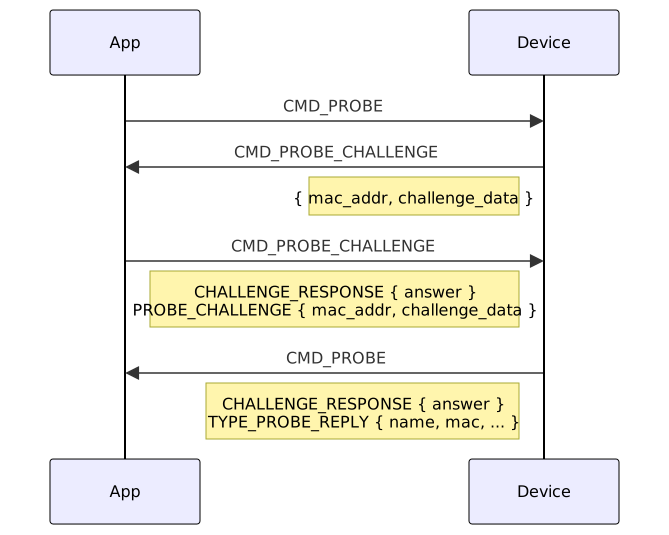
Click here if you prefer to see the mutual auth in packet format
Start commCommand: 0x0101 (CMD_PROBE)
TYPE_APP_PROBE
OS: ANDROID (1)
App: HEALTHMATE (1)
Version: 7050201
TYPE_APP_PROBE_OS_VERSION
OS Version: Unknown (35)
get challenge
Command: 0x0128 (CMD_PROBE_CHALLENGE)
 TYPE_PROBE_CHALLENGE
     MAC Address: a4:7e:fa:44:xx:xx
     Challenge Data: 3FE94B29BD69F0A3FE2B0B18401941CF
reply & send challenge
Command: 0x0128 (CMD_PROBE_CHALLENGE)
 TYPE_PROBE_CHALLENGE_RESPONSE
     Answer Data: ECC5AF489073ED62879E0184E4DE411A4B36A10A
 TYPE_PROBE_CHALLENGE
     MAC Address: a4:7e:fa:44:xx:xx
     Challenge Data: 69BDB44D10ECB2EB5A6E06960ECD066C
receive final response
Command: 0x0101 (CMD_PROBE)
 TYPE_PROBE_CHALLENGE_RESPONSE
     Answer Data: 93692C1AF192832A453B228CE435F691754CF04F
 TYPE_PROBE_REPLY
     Name: ScanWatch 2
     Manufacturer ID: 00280074
     Software Version: 2871
     ...
 TYPE_FACTORY_STATE
     Object Data: 00
In this flow, there's an "answer" to the challenge, and we need to figure out how it's calculated
$ grep -R setAnswer
wpp/generated/object/ProbeChallengeResponse.java:    public ProbeChallengeResponse setAnswer(byte[] bArr) {
grep: base/resources/classes6.dex: binary file matches
grep: base/resources/classes3.dex: binary file matches
This is promising, we can decompile classes3.dex with jadx check what matches:
private static ProbeChallengeResponse a(ProbeChallenge probeChallenge, String str) {
    byte[] bArrDigest;
    ByteBuffer byteBufferAllocate = ByteBuffer.allocate(...);
    byteBufferAllocate.put(probeChallenge.challenge);
    byteBufferAllocate.put(probeChallenge.mac.getBytes());
    byteBufferAllocate.put(str.getBytes());
    try {
        bArrDigest = MessageDigest.getInstance("SHA1").digest(byteBufferAllocate.array());
    } catch (NoSuchAlgorithmException e) {
        qm0.b.q(e);
        bArrDigest = null;
    }
    ProbeChallengeResponse probeChallengeResponse = new ProbeChallengeResponse();
    probeChallengeResponse.answer = bArrDigest;
    return probeChallengeResponse;
}
Seems simple enough: SHA1(challenge + mac + str), but.. what is str here?
We can follow the call-graph a bit and find some mac-address based lookup, with a lovely exception if that's not found
public class NoKlSecretProvidedException extends IOException {
    public NoKlSecretProvidedException() {
        super("The device sent a probe challenge but we don't have klSecret for it");
    }
}
and we can find that kl is stored during association
public void initWithAssociation(Association association) {
    initWithDeviceProperties(association.deviceproperties);
    setAssociationDate(association.created);
    setKlSecret(association.klSecret); // <--
so: it's some value that we receive during association (pairing?), and store, keyed by the device's (watch's) MAC address.
I got the secret key from a previous capture (censored because i don't know if it's sensitive); where the phone told the watch what the key would be
Command: 0x0134 (CMD_ASSOCIATION_KEYS_SET)
TYPE_ACCOUNT_KEY
    Secret: aaaaaaaaaaaaaaaaaaaaaaaaaaaaaaaa
TYPE_ADV_KEY
    Secret: aaaaaaaaaaaaaaaaaaaaaaaaaaaaaaaa
What's the point of the phone telling the watch the key, then asking the watch to confirm it has it? The only thing I can think of, is that CMD_ASSOCIATION_KEYS_SET can only be done
shortly after pairing..
To verify the algorithm, we can run this script:
challenge = "3FE94B29BD69F0A3FE2B0B18401941CF" # from watch
mac = "a4:7e:fa:44:xx:xx" # from watch
secret = "aaaaaaaaaaaaaaaaaaaaaaaaaaaaaaaa" # from CMD_ASSOCIATION_KEYS_SET
combined = unhexlify(challenge) + mac.encode() + secret.encode()
response = hashlib.sha1(combined).hexdigest().upper()

print(f"Response:       {response}")
and... get ECC5AF489073ED62879E0184E4DE411A4B36A10A back.. which is the expected value!
I felt very lucky getting this in one go, I usually waste a lot of time getting things like casing, or string formatting (ie: removal of : from the mac address) correctly.
Actually talking to the watch
Communication with the watch happens over Bluetooth Low-Energy (BLE), the watch advertises services, which group characteristics (data) and descriptors (metadata).
The expected programming model would have something like:
- Service (Health)
  - Characteristic: Heartrate
    Value: 70
    Descriptor: Configuration (enable/disable notifications on threshold)
  - Characteristic: Sensor location
    Value: 1 (wrist)
    Descriptor: User description ("Body location")
But, as far as I understand, this code is iterating through services where the UUID contains 5749-5448 (WITH), and returning the characteristics which contain "494E4753" (INGS)
We can see the services/characteristics with bluetoothctl
list-attributes CF:89:D9:5D:36:3F
Primary Service service000e
        00000000-0000-5749-5448-494e47530000
Characteristic service000e/char001c
        00000008-0000-5749-5448-494e47530000
Characteristic service000e/char001a
        00000007-0000-5749-5448-494e47530000
Characteristic service000e/char0018
        00000006-0000-5749-5448-494e47530000
Characteristic service000e/char0015
        00000005-0000-5749-5448-494e47530000
Descriptor service000e/char0015/desc0017
        00002902-0000-1000-8000-00805f9b34fb
        Client Characteristic Configuration
Characteristic service000e/char0012
        00000004-0000-5749-5448-494e47530000
Descriptor service000e/char0012/desc0014
        00002902-0000-1000-8000-00805f9b34fb
        Client Characteristic Configuration
Characteristic service000e/char000f
        00000003-0000-5749-5448-494e47530000
Descriptor service000e/char000f/desc0011
        00002902-0000-1000-8000-00805f9b34fb
        Client Characteristic Configuration
Primary Service service000a
        00001801-0000-1000-8000-00805f9b34fb
        Generic Attribute Profile
Characteristic service000a/char000b
        00002a05-0000-1000-8000-00805f9b34fb
        Service Changed
Descriptor service000a/char000b/desc000d
        00002902-0000-1000-8000-00805f9b34fb
        Client Characteristic Configuration
I tried to develop a bit on my laptop, as speed of iteration would be much quicker, but it was extremely frustrating, connection would seemingly fail every time, requiring a re-pair. In the end, it was easier to iterate directly on an android app on my phone.
Poking at the API
I installed HTTP Toolkit and saw that of course there are dozens of requests sent to a few domains on every click.
Particularly curious were /cgi-bin/association; and not just because they seem to be using fucking CGI-bin in 2025, but because the payload contains
{
  "associations": [
    {
      "associationid": 0,
      "deviceid": 0,
      "devicename": "",
      "kl": "aaaaaaaaaaaaaaaaaaaaaaaaaaaaaaaa",
      "deviceproperties": {
        "id": 15908999,
        "sn": "SN-a4:7e:fa:44:xx:xx",
        "macaddress": "a4:7e:fa:44:xx:xx",
        "deviceproperties": {
          "latitude": 52.300,
          "longitude": 4.900
        }
      }
    }
  ]
}
it's:
- leaking my watch's secret key
- leaking my mac address (= somewhat trackable)
- leaking my location (manually truncated on the payload)
i don't know why i thought a french company would be less bad than an american/chinese company. seems like it's not the case.
guesses / interesting
CMD_STORED_MEASURED_SIGNAL_GET
WAM = withings activity monitor WSD = withings service discovery WPM = withings protocl manager WSM = withings sleep monitor
 RSS feed